How to use the Meta Ad Library to research competitor ads
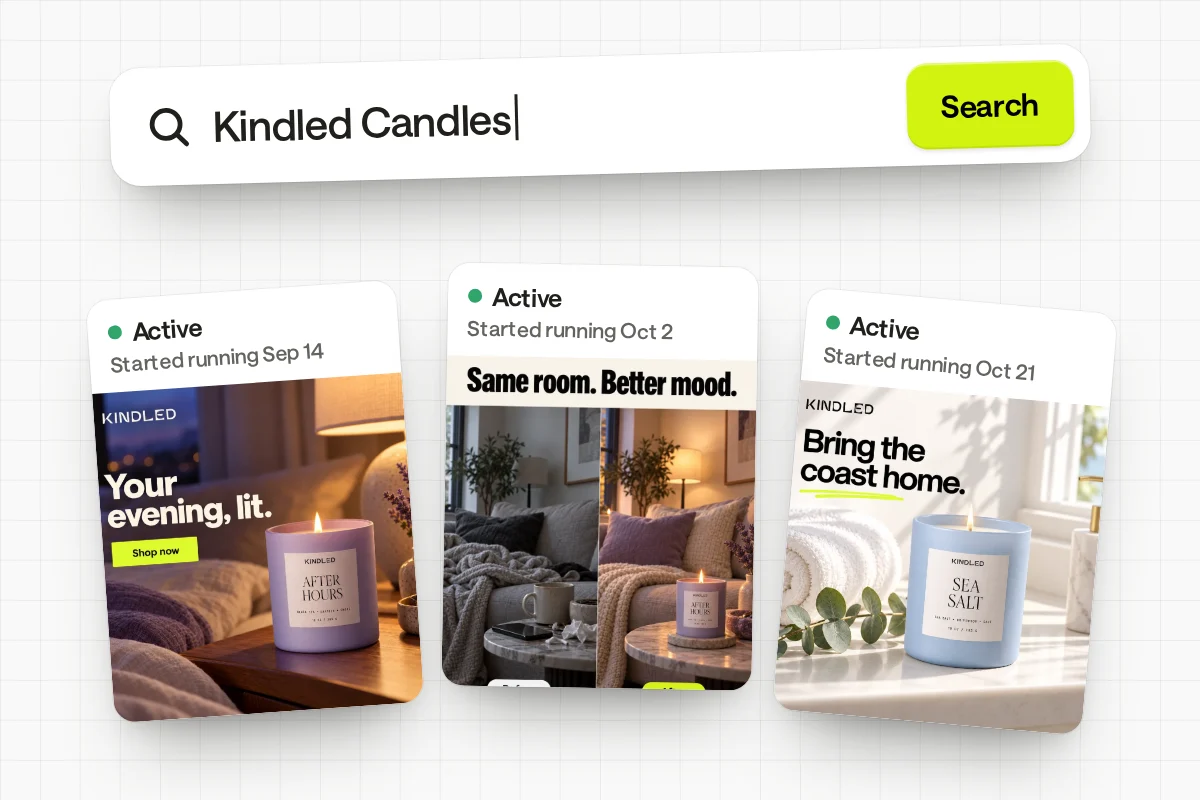
The Meta Ad Library is a free, public search of every active ad on Meta's apps, and you don't need to log in. Search a competitor's Page name or a product keyword, filter to active ads, and check each ad's start date. For normal product ads it shows the ad itself but no spend or results.

What the Meta Ad Library is
It's Meta's public archive of ads. Meta's transparency page says people can search all active ads running across Meta's products. Its Platform filter lists six: Facebook, Instagram, Audience Network, Messenger, WhatsApp and Threads.
It costs nothing. When we opened it on November 10, 2026, search results and ad details loaded with no Facebook login. Lilach Bullock notes that logging in adds more filtering options.
You can reach it at facebook.com/ads/library. Bookmark it, because you'll come back every time you plan new ads.
How to search the Ad Library, step by step
Here is the search as it looked on November 10, 2026.
- Go to facebook.com/ads/library.
- In the first dropdown, pick the country where you sell, such as United States.
- In the second dropdown, leave All ads selected. The other choices are special categories: Issues, elections or politics, Housing, Employment, and Financial products and services.
- Type into the box labeled Search by keyword or advertiser. A Page name shows that one business. A word like "soy candle" shows every ad that uses it.
- Press Enter. The results page shows a rough count, for example "~36,000 results" for "candle".
- Use Sort to switch between Impressions: high to low and Most recent.
Example: a small dog treat brand searches "dog treats", sorts by most recent, and opens the five newest ads from shops its size. Then it searches the two brands it competes with most by name.
Ad Library filters worth using
Click Filters above the results. On November 10, 2026 the panel held six options:
- Language: useful if you only sell in English.
- Advertiser: narrow a keyword search to a few brands.
- Platform: see only Instagram ads, for example.
- Media type: images, memes or videos, among other choices. This shows whether a competitor leans on video.
- Active status: set it to Active ads to see what's running now.
- Impressions by date: pick a date or range, such as the four weeks before last Black Friday.
The library also tags ads seen fewer than 100 times since launch with a Low impression count label, which PPC Land dates to December 2025. Skip those ads. Almost nobody saw them.
What the Ad Library shows and what it hides
For an ordinary product ad from a US shop, the details panel showed the following on November 10, 2026:
- whether the ad is Active
- a Library ID for that ad
- Started running on and a date
- the platforms it runs on
- the ad itself: text, image or video, headline, link and button
- a note when This ad has multiple versions, with a counter such as "1 of 5"
What's missing is the money. The US ads we opened showed no spend, reach or results, and Lilach Bullock says commercial ads show no spend or performance data at all. You can't see budget, clicks, sales or targeting.
Two kinds of ads show more. For ads about social issues, elections or politics, Meta adds spend, reach and who paid, and keeps them for 7 years. Ads that reached anyone in the EU carry an EU transparency label, and Meta shares more data on those. A US-only shop's ads won't have it.
How to read how long an ad has run
Run time is the best clue the library gives you. Lilach Bullock says an ad live for eight months can be a winner the advertiser hasn't dared touch, but calls run time "a clue, not proof".
To read it:
- Check the Started running on date and count the months to today.
- Look for the same image or video under several start dates. A creative a brand keeps relaunching is worth a closer look.
- Open ads marked with multiple versions. In one of Bullock's searches, 11 of 34 ads were nearly identical with three different headlines, which pointed to a headline test.
- Sort by Impressions: high to low. Meta doesn't show the impression numbers, but the order tells you which ads reached the most people.
Give more weight to shops your size than to national chains, whose budgets and goals look nothing like yours.
What to borrow and what never to copy
Bullock's rule is to copy an ad's structure and leave the ad itself alone. Her advice is to pull out the hook, the proof and the offer, because those transfer even when the words don't.
Fine to borrow
- The kind of hook, such as opening on a problem or a before-and-after
- The offer shape, like a bundle or free shipping over a set amount
- The format: a short video, a carousel, a plain product photo
- The type of proof used, such as reviews or a founder talking
Don't copy
- Their photos, video footage, music or exact wording
- Their logo, brand name or distinctive product design
- Claims you can't back up for your own product
Meta's copyright and trademark policy bans ads that infringe anyone's intellectual property. Meta can reject an ad after a rights holder reports it, or when an ad shows signs of infringing. Our Facebook ad examples and ad hooks guide show how to turn a borrowed idea into your own ad.

Turning your research into ads with ScaleShot
Once you've picked an angle, ScaleShot's Ads Agent can help. It can search the web for competitors and trends, then make image and video ads for your brand from a chat request. You see each ad as a card and approve it before any credits are spent. If you want to test the angle, our guide to Facebook ad creative testing covers the next step.
Meta Ad Library questions
Is the Meta Ad Library free?
Yes. It's a free, public tool, and you can browse it without logging in.
Can I see how much a competitor spends on Facebook ads?
Not for normal product ads, which show no spend in the library. Meta adds spend figures for ads about social issues, elections or politics.
How do I see all ads from one business?
Type the business's Page name into the search box, then set the Active status filter to Active ads. That lists everything the Page is running now.
Does the Ad Library show Instagram ads?
Yes. The Platform filter covers Instagram alongside Facebook and Meta's other apps.
Can I copy a competitor's ad if I change the wording?
Reusing their images, video or brand marks can get your ad rejected under Meta's intellectual property rules. Borrow the idea and make your own creative.
ScaleShot TeamWe build ScaleShot, an AI ad tool for small businesses on Facebook and Instagram. How we make our guides
Sources
- Meta Ad Library (search, filters and ad details, viewed logged out), Meta
- Meta Ad Library tools, Meta Transparency Center
- How to use the Facebook Ads Library for research, Lilach Bullock
- Copyrights and Trademarks, Meta Transparency Center
- Meta Ads Library adds WhatsApp filter and low impression labels, PPC Land